
Opendoor - Buy and Sell Homes
Opendoor Labs, LLCHouse & Home
4.5777.00 Reviews
- Version
- 300.0.23
- Installs
- 500.00K
- Age Rating
- Everyone
Screenshots
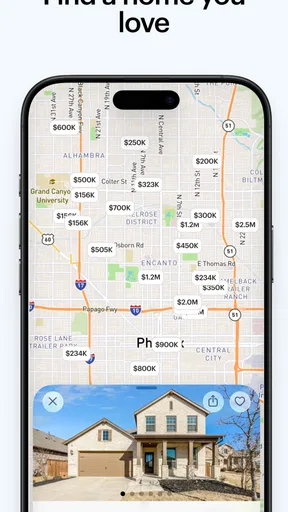
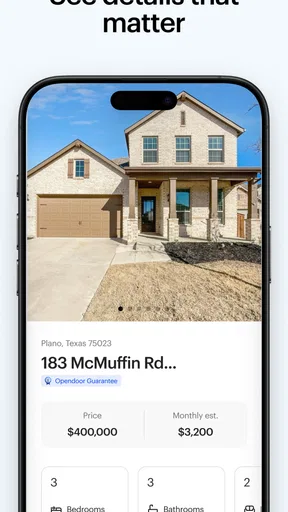
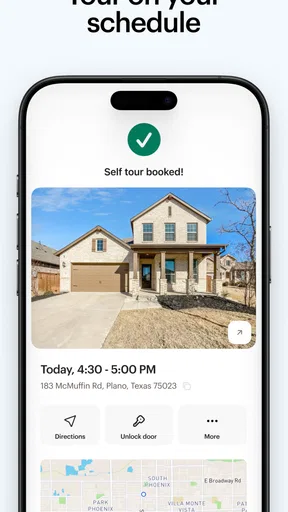
Our Review of Opendoor - Buy and Sell Homes
 Analysis by Appyee
Buying or selling a home is usually a project spread across messages, appointments, paperwork, and difficult timing decisions. Opendoor tries to make that process feel more contained by putting the search and selling sides in the same mobile experience. I reviewed it as a House & Home app from Opendoor Labs, LLC, and my first impression was that it is most useful when you are already thinking seriously about a move rather than casually browsing property photos.
The app is free and available to Everyone, which makes it easy to try without committing money at the starting line. It has built a sizeable audience, with over 500 thousand installs and an average rating of 4.5 from around 3.5 thousand ratings. Those figures suggest that the straightforward idea has connected with many users, but they do not remove the need to look carefully at how the service fits a particular move. A home transaction is too important to judge by convenience alone.
What the first week feels like
During the first week, the appeal comes from having a focused place to begin. Instead of jumping between a general property marketplace, a separate selling service, and a collection of browser tabs, I can use the Opendoor experience as a starting point for both sides of the decision. That is especially helpful when I am not sure whether I should sell first or search first.
The strongest early benefit is mental organization. A person preparing for a move often has two questions running at once: “What could I buy?” and “What can I do with my current home?” Keeping those questions connected makes the process feel less fragmented. I found that this is more valuable than a simple list of attractive homes, because it encourages me to think about the entire move rather than treating the next property as an isolated purchase.
It is also a sensible app for early comparison. I can look at possible homes, consider how they might change my routine, and think about the practical consequences of selling my existing place. That does not replace professional advice or careful financial review, but it gives the process a more useful shape than aimless browsing. If you are at the “maybe we should move” stage, the app can help turn a vague idea into a set of questions.
My advice is to use the first week as an information-gathering period, not as a reason to make a rushed commitment. Save or note the homes that genuinely suit your needs, then compare them by commute, space, neighborhood feel, and likely moving effort. At the same time, treat any selling path as a separate decision that deserves its own scrutiny. The convenience of one app should not blur the difference between exploring and agreeing to a transaction.
Useful for a move with two timelines
The app makes the most sense for someone coordinating a sale and a purchase close together. For example, imagine a family whose rental agreement is ending while one parent has accepted a job in another area. They may need to understand the possible home options while also deciding how to handle the existing property. A unified starting point can reduce the number of places they need to check while they build a realistic plan.
That scenario also exposes an important trade-off. A simple workflow can save attention, but it may encourage users to focus on speed. In a home move, speed is only one factor. I would still write down the dates that matter, estimate the cost of temporary housing or storage, and keep a record of questions that need answers before taking action. The app is a useful organizer, not a substitute for that personal checklist.
Another practical tip is to separate emotional reactions from decision criteria. A polished home listing can make a move feel immediately exciting, while the selling side may appear like an administrative chore. I get better results when I decide in advance which needs are non-negotiable and which features are merely pleasant. That keeps the browsing experience from turning into an expensive wish list.
Where it differs from ordinary property browsing
Traditional property apps are often strongest when the user wants to search broadly across listings and compare homes. A real estate agent can add local knowledge, negotiation experience, and a human explanation of complicated choices. Opendoor occupies a different position: its appeal is the connection between buying and selling in one place.
That makes it attractive to a homeowner who values a more direct digital process. It is less compelling for someone who wants a wide-ranging research tool, detailed neighborhood investigation, or a relationship with an adviser who knows the local market personally. In those situations, a conventional marketplace, a local agent, or both may be better companions.
I would not install it expecting a complete replacement for every housing resource. I see it as a focused tool for people who want to explore a move through a single service. The distinction matters because the best app depends on the question you are asking. “Can I organize a possible move?” is different from “What is every available home in this area?”
What remains useful after the novelty fades
The lasting value depends on whether the app continues to reduce friction once the initial curiosity disappears. For me, the answer is yes, but only for a specific kind of user: someone actively weighing a sale, a purchase, or both. The buy-and-sell connection remains relevant throughout a moving cycle because the two decisions affect each other.
For a homeowner, recurring value can come from returning to the same planning context instead of restarting research in unrelated services. I can revisit the homes that fit my requirements, reconsider timing, and keep the sale side in view. That is more practical than using a property app only for occasional entertainment. The app earns continued attention when it helps me make progress toward a real decision.
It is not equally useful as a casual lifestyle app. If I am not considering a move, there is little reason to open it regularly just to browse. The value is event-based rather than daily. That is not a weakness by itself, but it means the app should be judged by how well it supports a housing project, not by whether it creates a habit like a social or finance app.
This is where I think the product’s free access matters. I can keep it available while I compare options without adding a subscription to an already expensive process. Still, “free” does not mean the overall service is costless. The financial consequences belong to the home transaction, and I would carefully review any terms, estimates, and obligations before treating an in-app path as the right one.
A workflow I would actually use
I would begin by defining the move in writing: why I am moving, when I hope to move, what property type suits my household, and what would make the timing unrealistic. Then I would use the app to explore the buying side and the selling side separately before trying to connect them. This prevents the convenience of a single interface from hiding an unclear plan.
Next, I would create a short list rather than collecting every appealing possibility. For each home, I would record the practical reason it remains under consideration. Is it close to work? Does it solve a space problem? Does it fit the expected transition period? This approach makes the app more useful over time because each return visit is about comparing decisions, not repeating the same browsing.
On the selling side, I would prepare a home information folder outside the app. I would keep relevant documents, repair notes, appliance details, and questions together so that I am not relying on memory when the process becomes more active. That is one of the less obvious ways to reduce friction: the app can be the digital starting point, but personal organization still determines how smoothly the move proceeds.
Finally, I would set a review point after several days. If the app is helping me clarify timing and options, I would continue. If I am only scrolling without learning anything new, I would switch to a more targeted approach, such as speaking with a local professional or researching a specific neighborhood. This keeps the tool in its proper role instead of letting it become a distraction.
Who gets the most recurring value
The best match is a homeowner who wants to combine exploration with a possible sale, especially someone comfortable handling early research on a phone. It can also suit a buyer who is trying to understand whether a move is realistic before making appointments or committing to a formal process. The unified focus is helpful when the purchase cannot be separated from the existing home.
It is less suitable for a person who wants a broad, neutral catalog of every possible property source. It is also not my first choice for someone who prefers all decisions to be guided through face-to-face conversations. A digital-first workflow can be efficient, but it asks the user to stay organized, read carefully, and know when an important question needs human help.
People who are only curious about home prices may find the app more substantial than necessary. The same is true for renters who are not considering ownership or a sale. In those cases, a general property search tool may be easier for casual research. Opendoor becomes more convincing when the user has a genuine connection between selling and buying.
Maintenance, friction, and the parts that can become tiring
The maintenance burden is fairly light in the ordinary app sense. It is free, its current version is 210.2.0, and it supports devices running Android 7.0 or later. That broad compatibility makes it approachable for people who are not using a recent phone. I still recommend keeping the app updated when possible, because housing information and transaction workflows are the kind of areas where an outdated app can become an avoidable source of trouble.
The heavier burden is not technical; it is cognitive. A home decision produces many details, and no streamlined interface can make those details disappear. I still need to compare dates, costs, property condition, location, and personal priorities. If I open the app without a plan, the experience can become another stream of information to manage rather than a solution.
There is also a risk of false simplicity. Seeing buying and selling together may make the transition look like one clean action, but real moves involve dependencies. A preferred home may not align with the sale timeline. A convenient offer may not match personal expectations. A promising listing may fail a closer inspection. I appreciate the unified concept, but I would never let the interface substitute for independent checking.
Another source of fatigue is repetition. If I am browsing without a clear next step, I can end up revisiting similar homes and postponing the harder questions. The best way around that is to assign each session a purpose: shortlist, compare, prepare questions, or review timing. Once that purpose is complete, closing the app is often more productive than continuing to scroll.
Questions I would settle before moving forward
I would want to know exactly what stage I am entering before submitting information or treating an in-app estimate as a firm outcome. I would also ask what responsibilities remain with me, which costs apply to the transaction, and how the timing works if my sale and purchase do not line up. These are not questions to leave until the final moment.
I would also clarify how property condition affects the selling process and what happens if the home needs work. Preparing a simple list of repairs and known issues helps me have a more grounded conversation than relying on a quick impression. The app can make the starting point convenient, but accuracy still depends on the information I provide and the checks I perform.
For a purchase, I would investigate the home beyond the screen. I would consider visiting the area at different times, checking the commute in realistic conditions, and looking closely at the surrounding routine rather than only the interior. A mobile listing can help me identify candidates, but it cannot fully reproduce the experience of living there.
I would also decide how much personal guidance I need. If I am comfortable researching and organizing, the app’s directness may be a strength. If I am uncertain about contracts, negotiation, local conditions, or the financial consequences of a move, I would bring in qualified advice rather than expecting the app to answer every question.
What makes the experience sustainable
The app works best when I use it as a decision workspace with boundaries. I would keep my shortlist small, maintain notes outside the app, and review my original priorities whenever a new property creates excitement. That habit protects me from confusing a smooth digital journey with a good housing decision.
I would also avoid treating the app as a replacement for the usual alternatives. A traditional agent may provide context that a digital workflow cannot. A broad property marketplace may expose more search possibilities. Direct conversations with lenders, inspectors, attorneys, or other specialists may answer questions that require professional judgment. The most sensible approach can be a combination, with Opendoor handling the part of the process where its connected buying-and-selling focus is genuinely useful.
For me, the lasting test is simple: after the first week, does opening the app help me make a clearer choice? If yes, it has earned a place in my moving toolkit. If it only gives me more listings to look at, the novelty has already faded and another resource may serve me better.
My long-term verdict
After looking beyond the initial convenience, I see Opendoor as a focused House & Home app rather than an all-purpose answer to real estate. Its strongest idea is putting the buying and selling journey close together, which can be genuinely helpful when a move involves both sides. The app is free, rated for Everyone, and developed by Opendoor Labs, LLC, making it easy for a wide range of users to test during the planning stage.
My main recommendation is to use it for structure, not blind speed. Let it help you organize a possible move, build a shortlist, and understand the path ahead. Then slow down for the parts that deserve independent research: condition, timing, costs, legal responsibilities, neighborhood suitability, and the advice of professionals when the decision becomes serious.
I would recommend it to homeowners who want a digital-first way to explore selling and buying together. I would be more cautious about recommending it as the only resource for a complex move, a highly specialized property search, or a situation where personal guidance is essential. In those cases, the usual alternatives may provide better depth even if they feel less streamlined.
The app earns lasting space on my phone only during an active housing project, not as a permanent daily habit. That is perfectly reasonable for this category. Its recurring value comes from returning to a meaningful decision with a clearer process, not from constant engagement. If your next move is real rather than hypothetical, Opendoor is worth trying as one part of a careful plan. If you are only browsing for entertainment, I would skip the extra layer and use a broader search option instead.
Privacy and Permissions
See what permissions an app requests and how it handles your data.
- Location
- approximate location (network-based), precise location (GPS and network-based)
- Phone
- read phone status and identity
- Photos/Media/Files
- read the contents of your USB storage, modify or delete the contents of your USB storage
- Storage
- read the contents of your USB storage, modify or delete the contents of your USB storage
- Camera
- take pictures and videos
- Microphone
- record audio
- Wi-Fi connection information
- view Wi-Fi connections
- Device ID & call information
- read phone status and identity
- Other
- view network connections, full network access, run at startup, control vibration, prevent device from sleeping
Verdict
Strengths of Opendoor - Buy and Sell Homes
- Browse listings with detailed photos, prices, and property information.
- Sell your home without scheduling repeated in-person showings.
- Digital paperwork makes offers and transactions easier to manage.
- Opendoor may provide a fast cash offer for eligible homes.
- Useful filters help narrow properties by location, price, and features.
Limitations of Opendoor - Buy and Sell Homes
- Service availability is limited to selected markets and eligible properties.
- Instant offers may be lower than the price achieved through a traditional sale.
- Additional service fees can reduce the final proceeds from selling.
- Home valuations may change after inspection or review of property condition.
- Buying through the app may offer fewer negotiation options than private sales.
Similar Picks in This Category
View All
Universal TV Remote Control
CodeMatics Media Solutions3.9

AlfredCamera Home Security app
Alfred Systems Inc.4.7

Planner 5D: AI Home Design
Planner 5D4.5

Universal Tv Remote-Cast to TV
One Music Player4.1

Zillow: Homes for Sale & Rent
Zillow Group4.8

99acres Buy/Rent/Sell Property
infoedge.com4.3
Frequently Asked Questions
What is Opendoor, and how does it work?
Opendoor is a real estate platform that lets users browse homes for sale, request an offer for their property, and manage parts of the buying or selling process online. Sellers can provide property details and receive a preliminary cash offer, while buyers can search available listings, schedule tours, and review home information through the app. Availability and services depend on the local market.
Can I really sell my home to Opendoor without listing it traditionally?
In many eligible markets, Opendoor allows homeowners to request a direct cash offer instead of listing their property with a traditional real estate agent. You normally submit information about the home, including its address and condition, for an initial estimate. The final offer may change after an inspection, and service charges, repair costs, closing expenses, and other terms should be reviewed carefully before accepting.
Are there fees or costs when selling a home through Opendoor?
Selling through Opendoor may involve a service charge and other transaction-related costs, such as repairs, title expenses, or closing costs. The exact amount can vary according to the property, location, market conditions, and offer terms. Before making a decision, compare the estimated proceeds with a traditional sale, where agent commissions, preparation expenses, and possible delays may also apply.
Can I use Opendoor to buy a home and schedule a tour?
Yes, Opendoor generally provides searchable home listings with photos, descriptions, pricing, and property details. Depending on the listing and location, buyers may be able to schedule an in-person or self-guided tour through the platform. Availability can vary, and some homes may have specific access requirements. You should verify the listing status, disclosures, financing conditions, and showing instructions before visiting.
Is Opendoor available everywhere, and is the app free to download?
The Opendoor app is typically free to download, although using the platform to buy or sell a home involves real estate transaction costs rather than an app subscription. Opendoor services are not available in every city or state, and features may differ by market. Check the current service area, eligibility requirements, and local terms in the app or on Opendoor’s official website before relying on it.
